NEW FEATURE: Communicate Directly with Locators Using Ticket Talk
NOW AVAILABLE: Ticket Talk, offered by North Dakota One Call, is a two-way communication feature that allows excavators and locators to message one another. This feature offers a streamlined way to connect with the right person quickly and easily in a text message-like format.
Efficient Communication: Reach the right person fast – select one or more facilities to contact locators without the hassle of tracking down phone numbers or emails.
Easy Access: Access Ticket Talk through ITICnxt or by clicking the link in the emailed copy of your ticket. You can also view messages on any ticket using Search & Status.
Tied Directly to the Locate Request: Stored right within the existing locate request, Ticket Talk messages offer a public history of nearly real-time communication that’s accessible for seven years.
Unread Message Alerts: Get alerts for new messages with email notifications sent right to the inbox of any email addresses included on the locate request*.
Ticket Talk is now available! Learn more about it by watching the official tutorial videos:
Questions about this new feature? Contact Christin Weaver at [email protected]
*Please note that some users may not receive a notice that a conversation message had been added.
Conversations in Ticket Talk do not replace stakeholder, locator, or excavator legal responsibilities or the requirement to follow North Dakota One Call best practices. Ticket Talk conversations do not create a locate request. Conversations in Ticket Talk do not amend, update, or alter, the original notice of planned excavations in any way. Users MUST file a new ticket to make these modifications.
Please note that conversations are sent directly by the user to only those companies selected. Only selected users receive a conversation message.
Ticket Talk conversations are publicly available through Search and Status. Users are, therefore, strongly cautioned to avoid posting sensitive information including but not limited to access codes, personal phone numbers and other private information.
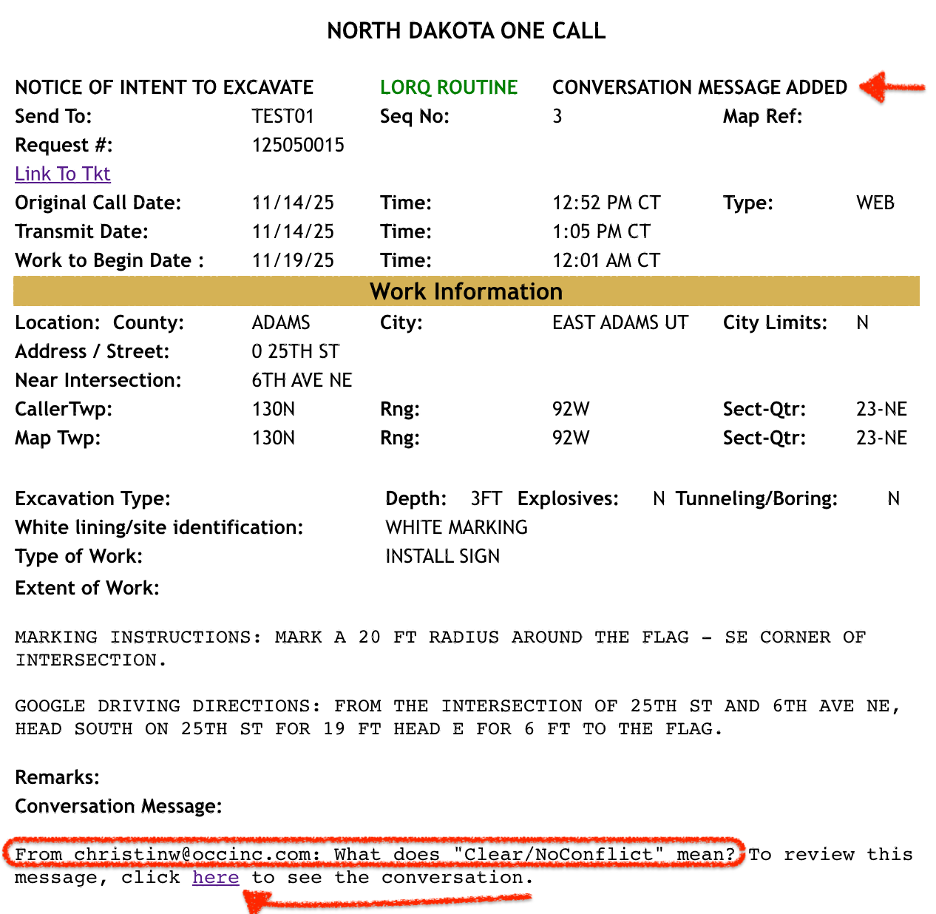
When a new Conversation Message is added, you will receive an emailed copy of the ticket with the “Conversation Message Added” header code. The most recently added message will appear in the designated Conversation Message field, along with a direct link to the entire conversation in the online version of the ticket.
On a Daily Ticket Audit newly added conversation messages will be listed in their own column along with the “CMA” tag (“Conversation Message Added”).
